Recipe · portrait · 3 scenes
Lyric video (vertical)
A 9:16 lyric video for a song, hook or spoken-word track: big lyric lines that fill word by word on the beat over a dimmed audio spectrum, a beat-cut montage drop, then an end card. Swap in your timed lyrics and your track.
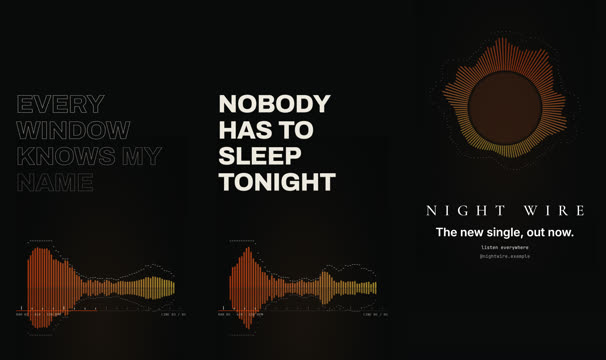
Motions in this recipe

Audio spectrum (bars / circle / wave / scope)
Music promos, podcast and audiogram clips, DJ / event ads, lyric-video backdrops; pass the same soundtrack path the composition plays.
audio-spectrum
Lyric video (karaoke + beat)
Lyric videos, word-synced song captions, music promos: pass `lyrics` (word timings) or just `lines` + `bpm`/`offsetSec`.
lyric-video
Accelerating beat montage
Recaps, "so many examples" sequences, showreels, building energy before a reveal.
beat-montage
End card credits
Closing cards, "how it was made" stats, credits and calls to action over the last shot.
end-card-credits
Use it in Remotion, React or HTML
CLI
# render the recipe to out/lyric-video-vertical.mp4 (run in the library folder)
node cli/mgl.mjs recipe lyric-video-vertical

# copy just this recipe's source into a Remotion / React project
node cli/mgl.mjs add lyric-video-vertical --to ../my-app/src
React
import {MotionMix} from 'opus-motion-library/web';

<MotionMix recipe="lyric-video-vertical"
  playOnView
/>
HTML
<script src="opus-motion.element.js" defer></script>

<opus-motion recipe="lyric-video-vertical">
</opus-motion>
recipes/lyric-video-vertical.json
{
  "id": "lyric-video-vertical",
  "title": "Lyric video (vertical)",
  "useFor": "A 9:16 lyric video for a song, hook or spoken-word track: big lyric lines that fill word by word on the beat over a dimmed audio spectrum, a beat-cut montage drop, then an end card. Swap in your timed lyrics and your track.",
  "format": "portrait",
  "background": "#0A0A0B",
  "tags": [
    "lyric",
    "lyrics",
    "music",
    "song",
    "video",
    "vertical",
    "portrait",
    "reel",
    "tiktok",
    "shorts",
    "karaoke",
    "spectrum",
    "beat",
    "audio",
    "artist",
    "release"
  ],
  "scenes": [
    {
      "duration": 320,
      "transition": {
        "type": "cut"
      },
      "layers": [
        {
          "motion": "audio-spectrum",
          "opacity": 0.6,
          "props": {
            "mode": "bars",
            "colors": [
              "#FF4D12",
              "#FF8A3D",
              "#FFD23F"
            ],
            "background": "#0A0A0B",
            "title": "",
            "caption": "",
            "bpm": 120,
            "mirror": true
          },
          "y": 0.3,
          "scale": 0.85
        },
        {
          "motion": "lyric-video",
          "props": {
            "lines": [
              "Midnight on the wire",
              "Hold the light a little longer",
              "Every window knows my name",
              "Turn it up and let it ring",
              "Nobody has to sleep tonight"
            ],
            "bpm": 120,
            "offsetSec": 0.25,
            "beatsPerLine": 4,
            "background": "transparent",
            "ink": "#EEE9DF",
            "accent": "#FF4D12",
            "align": "left",
            "size": 126,
            "showGrid": true,
            "beatReact": 1
          }
        }
      ]
    },
    {
      "duration": 132,
      "transition": {
        "type": "flash",
        "variant": "plain",
        "frames": 8
      },
      "layers": [
        {
          "motion": "beat-montage",
          "props": {
            "bpm": 150,
            "counts": [
              4,
              6,
              12
            ],
            "steps": [
              12,
              6,
              3
            ],
            "dotColor": "#FF4D12",
            "ringColor": "#FF8A3D",
            "paper": "#ECE4D7",
            "pingBeats": false
          }
        }
      ]
    },
    {
      "duration": 170,
      "layers": [
        {
          "motion": "audio-spectrum",
          "opacity": 0.45,
          "props": {
            "mode": "circle",
            "colors": [
              "#FF4D12",
              "#FF8A3D",
              "#FFD23F"
            ],
            "background": "#0A0A0B",
            "title": "",
            "caption": "",
            "bpm": 120,
            "mirror": true
          },
          "y": -0.2,
          "scale": 0.9
        },
        {
          "motion": "end-card-credits",
          "props": {
            "title": "NIGHT WIRE",
            "headline": "The new single, out now.",
            "lines": [
              "listen everywhere",
              "@nightwire.example"
            ],
            "credit": "",
            "backdrop": "none",
            "fadeToBlack": true,
            "headlineY": 0.7,
            "scrimStrength": 0.2
          }
        }
      ]
    }
  ],
  "notes": "Replace lyric-video.lines with your lyrics (or pass timed `lyrics` [{text, start, end, words}] from a transcription for exact sync) and set bpm / offsetSec to your song's grid (cli/beats.py finds them). Add your track as audio (spec.audio.music, or play it from the host) and pass its file to both audio-spectrum.src layers so the bars follow the real audio. beat-montage.images takes your artwork or stills; recolour with accent colours. Keep lyrics in the middle third, clear of the platform UI."
}